NO PHONE APP NEEDED · WORKS ON ANY PHONE
Turn Your Phone into a Mouse & Keyboard.
Just Scan the QR Code — That Easy.
Mouse stopped working or batteries died? You don't need to install any app on your phone. Simply open PCDeck on your Windows computer, point your phone's camera at the screen, and use your phone as a smooth touchpad right away.
Works on all phones: iPhone, iPad, Android, Mac & tablets. Connects directly over your local Wi-Fi or mobile hotspot. Zero cloud, zero sign-up. View setup guide & checksums.
Drag on the phone's trackpad below. Move the cursor, click desktop icons, or close the window with the × button — completely live!
Drag to move
Tap to click
the PC you're driving your phone ↑ the phone drives the PC ↑
Visual Overview
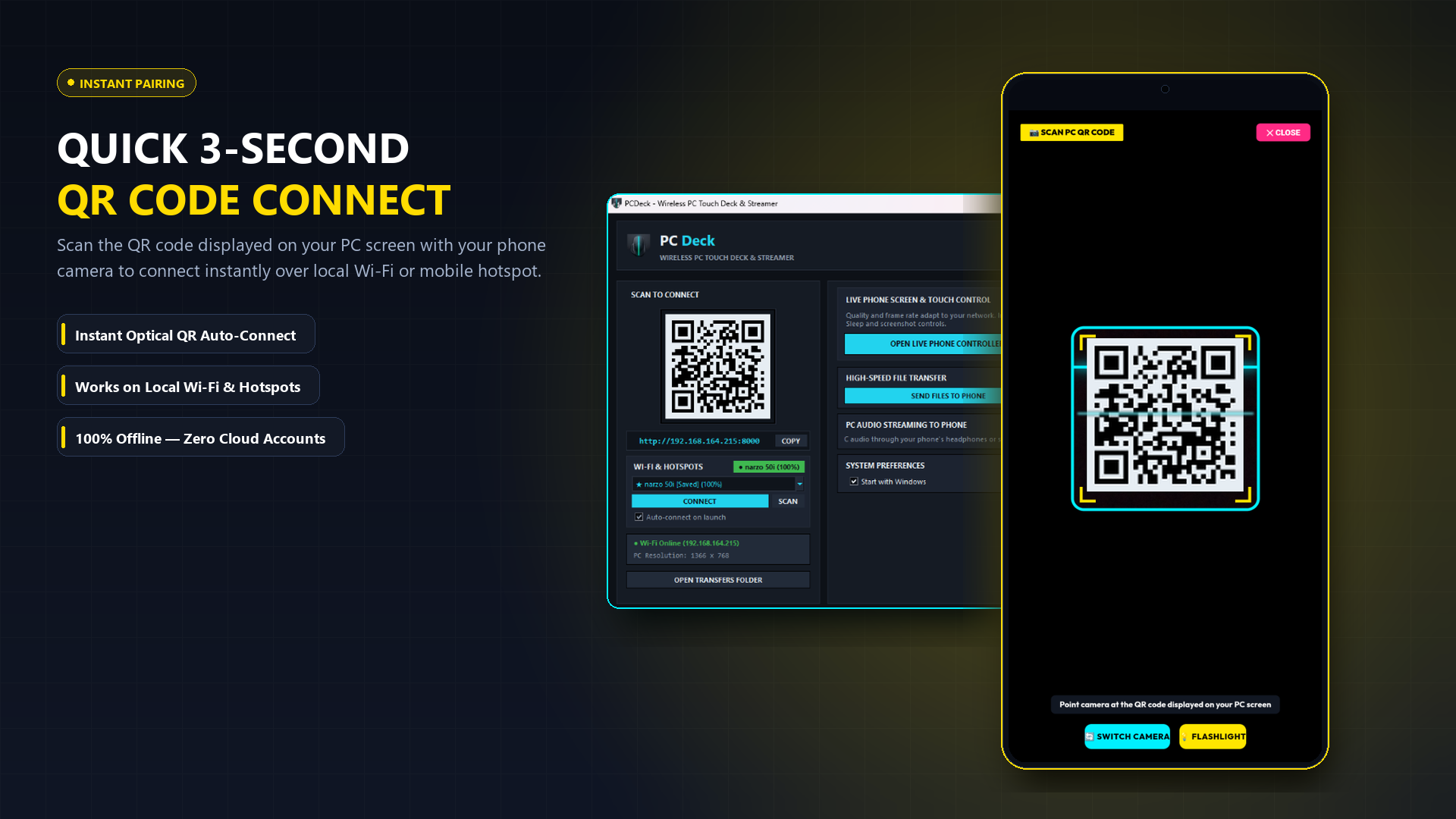
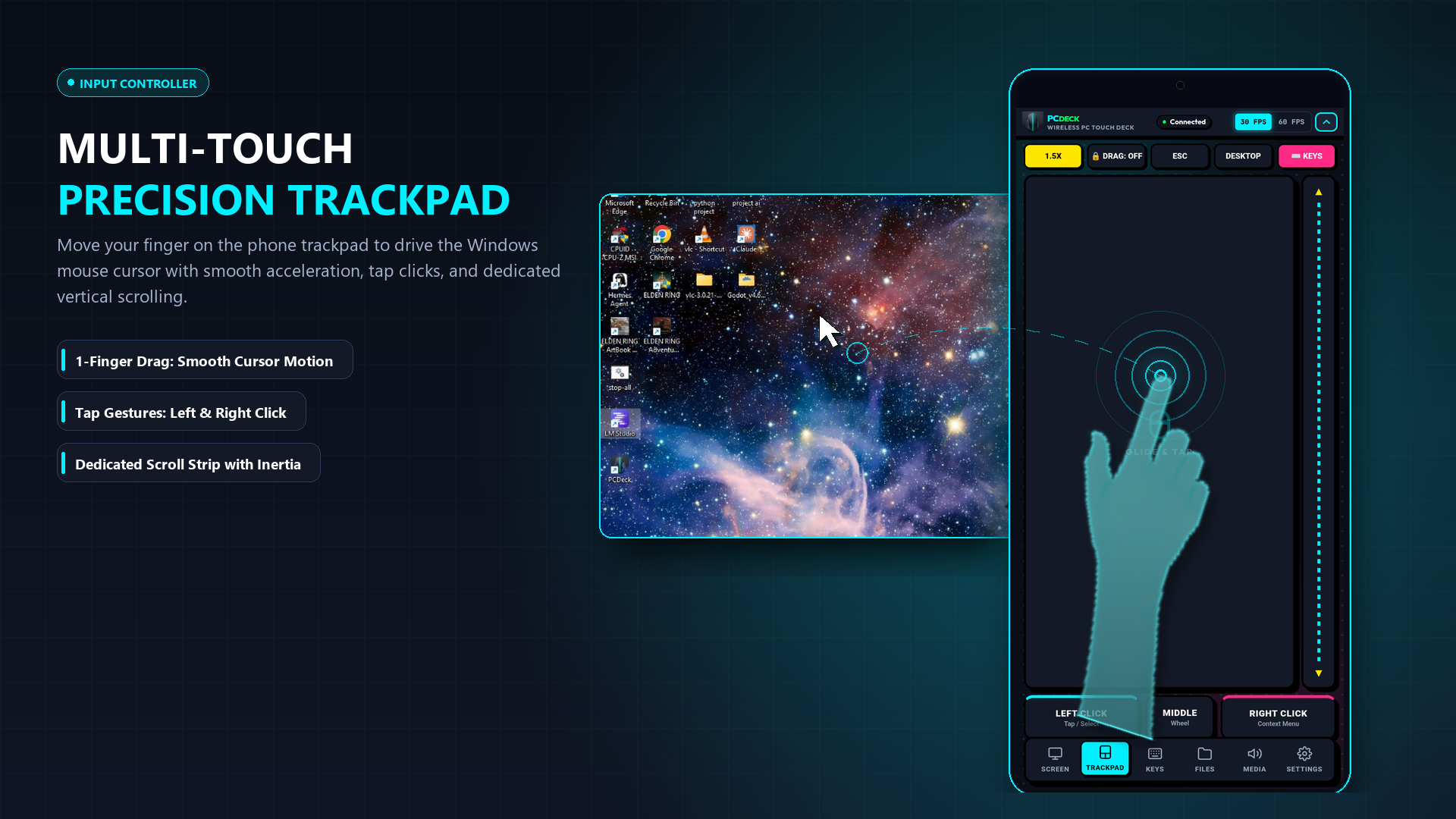
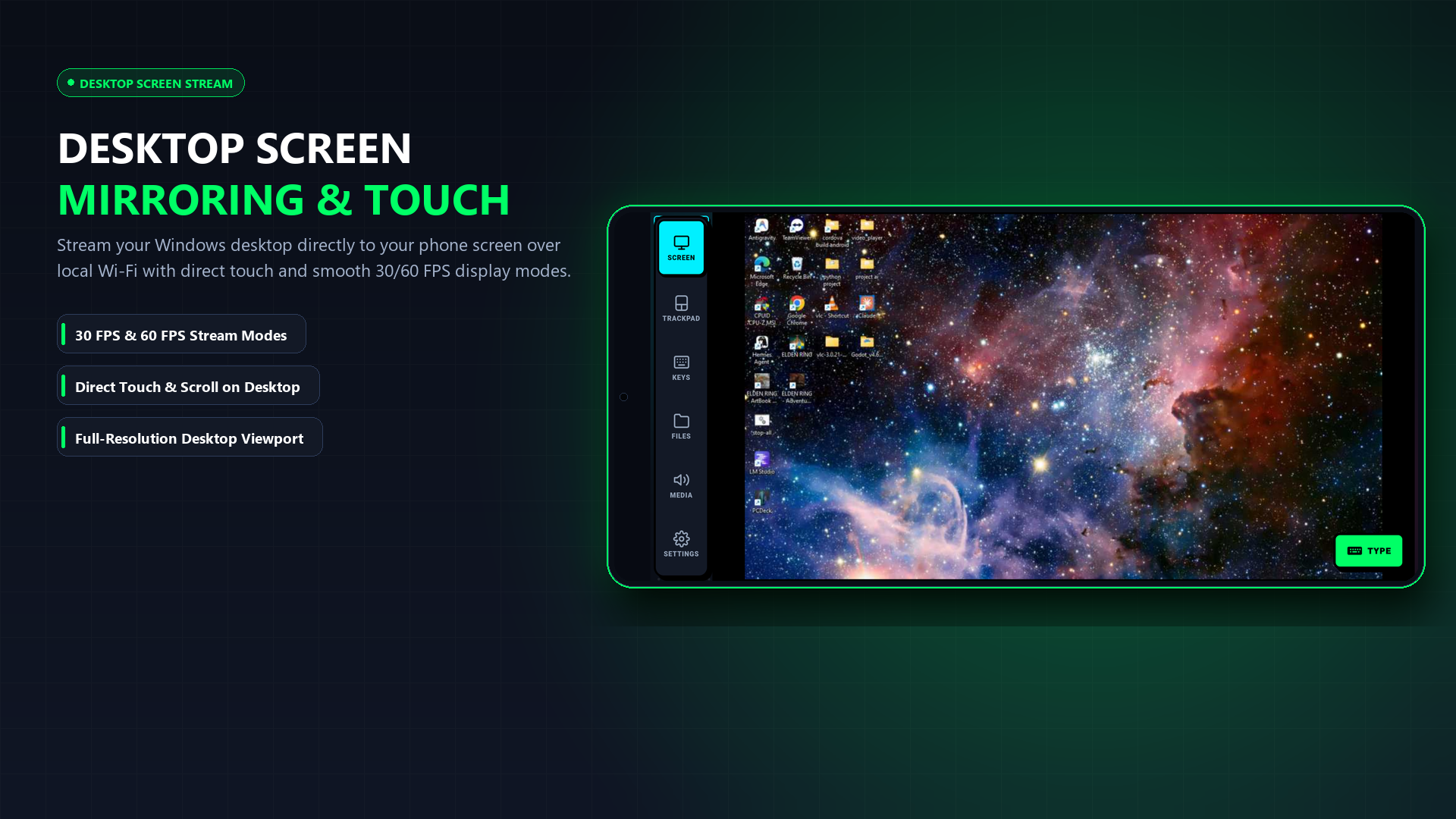
Real screenshots of PCDeck in action
No app store installation required on your phone. Simply run PCDeck on your computer, scan the on-screen QR code with your phone camera, and control your PC directly inside your browser.
What it does
Seven jobs, one local connection
Every feature runs between your phone and your PC on the same network. Nothing is relayed through a cloud server.
1. Trackpad & Mouse
Multi-touch surface with left/right click, two-finger scroll, and drag. Phone trackpad guide →
2. Keyboard & Numpad
Full on-screen keyboard with numpad, typing synced directly to Windows & Linux. Phone keyboard guide →
3. Zero-Install Web Remote
Instant browser control on iPhone, iPad, Mac & Linux via QR code with 0 app installs. Browser remote guide →
4. Emergency Screen Viewer
Streams the desktop to your phone, so a PC with a broken monitor stays usable. Phone as screen guide →
5. PC Audio to Phone
48 kHz stereo audio streamed to the phone, so earbuds become PC headphones. Stream PC audio →
6. Cable-Free File Transfer
Browse both devices side by side and move files over local Wi-Fi with auto-resume. File transfer guide →
7. Linux & Steam Deck Control
Full mouse, keyboard, and screen streaming support for Ubuntu, Debian, Arch & SteamOS. Linux remote guide →
Use cases
Mostly installed on a bad day
People rarely look for this until something breaks. These are the situations it was built for.
The screen is cracked or dark
A laptop with a dead panel or a desktop with no spare monitor still boots. Put the desktop on your phone and keep working until the part arrives.
Guides: use a PC without a monitor · phone as screen
The mouse or keyboard quit
No shop open, no spare peripheral. The phone covers pointer and typing well enough to finish what you were doing.
Guides: without a mouse · without a keyboard · phone as mouse
A headless box in a cupboard
A media or file PC running with no monitor attached. Check on it from the phone instead of dragging a display over.
Guide: control headless Windows PC
Watching from bed
Pause, skip and adjust volume from across the room, with the audio in your own headphones rather than the whole house's.
Guide: stream audio to headphones
Moving files, no cable
The USB cable is never where you left it. Browse both drives and copy across in either direction over Wi-Fi.
Guide: Wi-Fi file transfer
No router at all
On the road, run the PC off the phone's hotspot. PCDeck only needs the two devices on one network, not internet access.
Before you install
Why Windows and Android will warn you
PCDeck is not distributed through the Microsoft Store or Google Play. Both systems warn about any software that arrives that way. Here is exactly what you will see and what it means.
Read this first
The warnings are about publisher reputation, not detected malware
PCDeck is distributed independently outside the Microsoft Store and currently lacks an enterprise EV code-signing certificate. Windows Defender SmartScreen treats newly released unsigned executables as having unknown reputation on first launch, and Android prompts for unknown sources permission when sideloading an APK.
These warnings occur because the software is distributed directly rather than through commercial app stores; they do not by themselves establish that the file is malicious. Always verify the published SHA-256 checksum against your download, or inspect the PCDeck Security Architecture for network isolation details.
Windows
SmartScreen
“Windows protected your PC”
A blue dialog appears the first time you run the executable. This is Microsoft Defender SmartScreen reporting that the file is new and unsigned — it has no download reputation yet, and reputation is earned by volume over time.
To continue: click More info, then Run anyway.
Windows
Defender / AV
An antivirus flags it
PCDeck captures the screen, generates mouse and keyboard input, and opens a port on your local network. Because these native remote-control capabilities resemble patterns analyzed by heuristic scanners, unsigned utilities are occasionally flagged as false positives.
If flagged by your scanner: verify that the file came from the official PCDeck download, compare its SHA-256 checksum, review the detection details, and only override the warning if you understand and trust the software.
Windows
Firewall
“Allow PCDeck to communicate on this network”
On first run Windows Firewall asks whether to permit network access. PCDeck needs this — it is how your phone reaches your PC.
Tick Private networks and allow it. You can leave public networks unticked.
Android
Unknown sources
“Install blocked” / “unsafe app”
Android blocks sideloaded APKs until you grant permission once, per app that does the installing. Open the downloaded APK and, when prompted, allow Install unknown apps for the browser or file manager you downloaded it with.
If Play Protect adds that the app was not scanned before, choose Install anyway. That notice means the app is not in Play's catalogue, which is expected here.
Verify
the download
Check the file yourself
Run this in PowerShell and compare the result with the published checksum:
Get-FileHash .\PCDeck.exe -Algorithm SHA256
If the hashes differ, delete the file and download it again. Do not run it.
Setup
Connect in seconds — zero configuration
Choose instant zero-install browser control or install the native Android companion app.
1. Run PCDeck on PC
Start the standalone Windows executable. It immediately displays a QR code, local IP address, and active connection diagnostics.
2. Instant Web Remote (Zero-Install)
Open the camera on your iPhone, iPad, Mac, Linux, or Android device and scan the QR code. You get full touch trackpad, keyboard, 60 FPS screen stream, audio and files in Safari or Chrome with 0 app downloads.
3. Optional: Native Android APK
For dedicated hardware volume key control and background wake-lock, install the optional Android APK and scan the QR code to pair.
Comparison
Against the usual options
| Capability | PCDeck (Local Network) | Traditional Cloud Tools | Physical Hardware |
|---|---|---|---|
| Works with a broken PC monitor | Yes (Live desktop stream) | Requires pre-configured agent | Yes, if you have one |
| Extra hardware needed | None (Uses existing phone/browser) | None | Monitor + HDMI cable |
| Works without internet | Yes (100% offline LAN / Hotspot) | No (Requires cloud relay) | Yes |
| Streams PC audio to phone | Yes (48 kHz stereo PCM) | Rare / Premium add-on | No |
| Two-way file transfer | Yes (Direct LAN chunked transfer) | Cloud upload limit | Requires USB cable/drive |
| Cloud account required | None (Zero accounts / Zero sign-in) | Mandatory registration | No |
| Cost | Free, optional $3.99 Pro license | Subscription pricing | Hardware purchase |
FAQ
Questions people actually ask
Can I use a Windows PC if the monitor is broken or dead?
Yes — that is the main reason people install PCDeck. It streams the desktop to your phone and accepts touch as mouse input, so a machine with a cracked, dark or disconnected monitor stays fully usable. Set it to start with Windows and the phone can connect to a PC that never shows a picture locally. No second monitor or HDMI adapter is needed. Installing it before the screen fails is easier, so it is worth having in place ahead of time.
What can I use if my PC mouse or keyboard is broken?
PCDeck turns the phone into a multi-touch trackpad with left and right click, two-finger scrolling and drag, plus a full on-screen keyboard with a numpad. It covers pointer and typing well enough to finish what you were doing, needs no drivers on the PC, and works as an emergency replacement until the hardware is repaired. Windows also has built-in options that need no download at all — see how to use a PC without a mouse and how to use a PC without a keyboard.
Why does Windows say “Windows protected your PC”?
Because the executable is unsigned and new, not because anything harmful was found. PCDeck is distributed directly instead of through the Microsoft Store, so it has no code-signing certificate and no SmartScreen reputation yet. Click More info, then Run anyway. Verifying the SHA-256 checksum is a stronger check than the warning itself.
Why does Windows Defender or my antivirus flag PCDeck?
A wireless trackpad has to capture the screen, synthesise mouse and keyboard input and open a local network port. That combination looks like remote-access software to a heuristic scanner, and unsigned files get less benefit of the doubt. Those capabilities are the product working as intended. If the file is quarantined, restore it from your antivirus history and optionally exclude the PCDeck folder — after checking the checksum.
How do I install the APK when Android says install blocked?
PCDeck is not on Google Play, so Android needs one-time permission to install it. Open the downloaded APK and allow “Install unknown apps” for whichever browser or file manager you used. If Play Protect says the app was not scanned, choose Install anyway. You only grant this once.
Does PCDeck need an internet connection?
No. Everything runs on your local Wi-Fi, or on the phone's own hotspot if there is no router. There is no account, no cloud relay, no analytics and no telemetry, so screen contents and transferred files never leave your network.
Is PCDeck free, and what does the paid version add?
The free version covers trackpad gestures, the on-screen keyboard, 30 FPS screen streaming, PC audio streaming and the two-way file manager. A one-time $3.99 lifetime licence raises streaming to 60/120 FPS and unlocks faster transfers. There is no subscription, and the license activates directly with your order key.
Pro unlocks inside the app you already downloaded — there is no separate Pro build to hunt for. The APK below is the full app, free features first.
Can I control my PC from an iPhone, iPad, Mac or Linux?
Yes! PCDeck features a built-in Zero-Install Web Remote. When you launch PCDeck on your Windows PC, simply point your iPhone or iPad camera at the on-screen QR code (or navigate to your PC's local IP address in any browser). Safari or Chrome immediately opens the full touch controller with multi-touch gestures, on-screen keyboard, 60 FPS desktop streaming, PC audio receiver, and file manager — with zero app installation required.
Does PCDeck support Linux and Steam Deck?
Yes! PCDeck runs natively on Ubuntu, Debian, Fedora, Arch, Raspberry Pi OS, and SteamOS (Steam Deck). Simply run curl -sSL https://pcdeck.vercel.app/install.sh | bash in your Linux terminal to launch it immediately with multi-touch trackpad, keyboard, and screen streaming support.
Which Windows, Linux and Android versions are supported?
Windows 10 and Windows 11 as a standalone executable; Linux (Ubuntu, Debian, Fedora, Arch, SteamOS, Raspberry Pi) via universal 1-line script or binary; Android 5.0+ natively; and iOS/iPadOS/macOS via the instant Zero-Install Web Controller.
How does tapping the streamed screen click the right place?
The phone reports the touch coordinates, and PCDeck maps them onto your desktop resolution before issuing a native Windows mouse event at that point. Tapping a window, icon or button on the stream clicks that exact element.
Will it work on a weak Wi-Fi adapter or a cheap USB dongle?
Yes, and it is built expecting them. PCDeck watches the wireless link and reconnects on its own if it drops, renews the address if the network hands out a broken one, and resumes file transfers from where they stopped rather than starting over. Screen streaming quality can be lowered if the link is slow.
Download
Get PCDeck
Zero phone install required: You only need to run PCDeck on your computer. When you launch it, simply scan the on-screen QR code with your phone camera (iPhone or Android) — your mobile browser opens the full touch trackpad and keyboard immediately. The Android APK is completely optional for users who want a permanent icon on their phone.
Everything below is free: trackpad, keyboard, 30 FPS screen streaming, PC audio and the two-way file manager. Pro is a one-time $3.99 lifetime unlock inside the app for 60/120 FPS streaming and faster transfers — there is nothing extra to download and no subscription.
PC · Windows
PCDeck for Windows (v2.7.0)
The main PC app for Windows 10 & 11. Run it, scan the QR code with your phone camera, and control immediately.
- Windows 10 or 11 (64-bit)
- Standalone .exe (v2.7.0 · 46.8 MB) · No Python needed
- Unsigned — SmartScreen prompts once
Phone · Android App (Optional)
PCDeck for Android (v2.7.0)
Optional companion app for Android home screen. (Or simply use your browser by scanning the QR code).
- Android 5.0 or newer
- Direct APK download (v2.7.0 · 739 KB)
- Zero cloud accounts needed
PC · Linux & Steam Deck
PCDeck for Linux (v2.7.0)
Universal 1-line install for Ubuntu, Debian, Arch, Fedora & SteamOS.
- Zero configuration · Native X11/Wayland
- Automated dependency resolution (v2.7.0)
curl -sSL https://pcdeck.vercel.app/install.sh | bash
PC + Phone · Offline Bundle
Full Offline Bundle (v2.7.0)
Windows executable plus the Android APK and setup notes in one archive.
- ZIP archive (v2.7.0 · 47.1 MB)
- Includes Windows EXE & Android APK
- Useful for offline recovery
Verify
SHA-256 checksums
Because PCDeck is unsigned, this is how you confirm you got the real file and not something altered in transit. Hash your download and compare it character for character with the value here.
- PCDeck.apk690,963 BYTES
- 2b729b56dfe47aefa2ec974942457f85360efe4336e56cacd2d53132270a2d88
- PCDeck.aab682,195 BYTES
- 7a4d52f2981f4b753506b7b9483eb46a8307fbbf8f51d50c405d1901b9805cc9
- PCDeck.exe37,809,412 BYTES
- 03fedac96909da5662e1edbfaa57b5615b80a0a0b3153681219010ec377989a4
- PCDeck-Setup.exe39,266,524 BYTES
- 0c93e9b1fe2f0f820387ad7904dda9462bcdb5ec5137371a18609a77f4df2e65
- PCDeck_Package.zip52,157,822 BYTES
- 12070c35f477824fd1494b0161ca1855dc55dc9506fa5b597cebbf76a6ea5b9d
On Windows, run Get-FileHash .\PCDeck.exe -Algorithm SHA256 in PowerShell. On Android, any file-hash utility works. If the values differ, delete the file and download it again — do not run it.